Hi everyone,
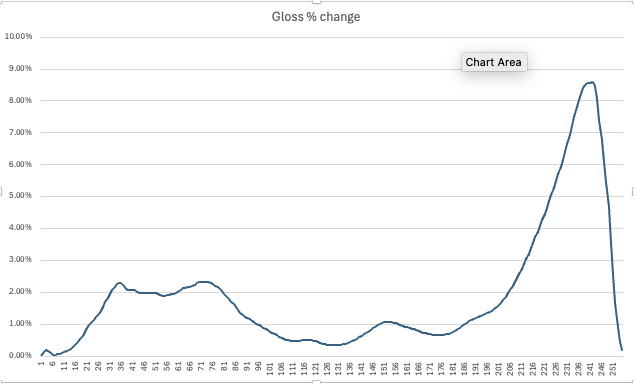
I have a question about gloss and scaling during the linearisation of Piezo Pro inks. I ran a quick test using both the Piezography Professional Tools and QuadToneProfiler-Pro, and while the overall difference is small, I noticed a variation in the highlight regions.
In the image above, I plotted the difference for Epson Premium Gloss paper and converted it into %. My question is: should gloss be scaled at all?
I’ve printed several images using both gloss channels (including cross-printing, for example, PP with QTP gloss and the reverse), and I can’t see a noticeable difference compared to the non-scaled gloss value.
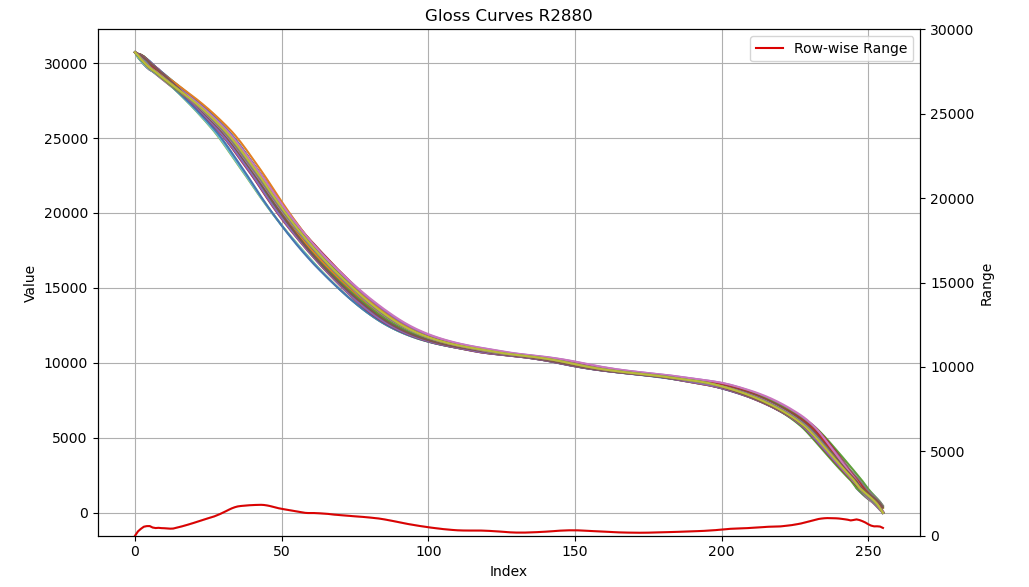
Looking at the standard curves, the differences between printers and papers seem quite small:
All gloss curves for the R2880 printer; the max–min value for each column is shown in red.
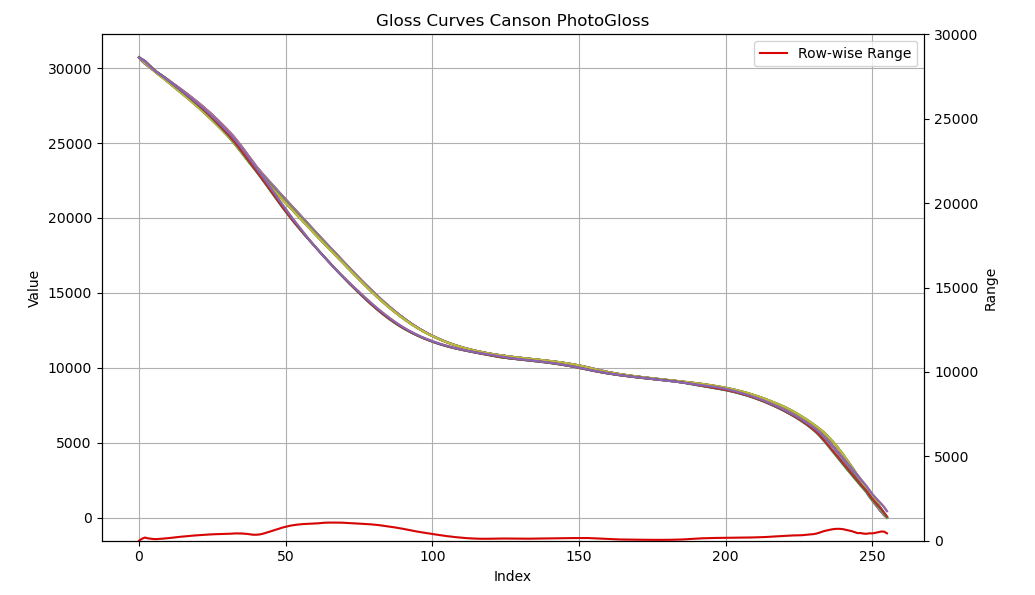
And when looking at the same paper across several printers, the variation is also minimal:
the difference is also very small.
So my question: do you scale the gloss values, or just leave them as they are? I can wrap my head around the scaling of the grayscale inks but the gloss feels a bit like black-magic…
Cheers
Anders
( sorry for the long post.. )
Hi Anders,
The only purpose of GCO is for gloss differential (inks and paper appear similarly glossy) and eliminate metamerism. It is the high value in the curve at location 0 that affects the amount on the paper and then it scales back to apply a “somewhat” even coating over the inks. But this amount of GCO over the inks is not as critical as over the paper. The effects of using linearization tools on a clear ink are not as dramatic as an actual ink.
What I was told to do as a good practice when I make custom curves for our customers is to copy and paste the original LLK (GCO channel) back into the custom from the original. This is done in a text editor like Sublime Text. If any unwanted effects of gloss differential are produced by custom linearization, this eliminates it. Of course, the application of GCO can be personal but is not a science. We offer different amounts of GCO in our installation packages.
One interesting thing you can do if you do not want any GCO on the paper but you want it on the inks and specular highlights is to remove the high value from field 0 in LLK channel and replace it with a 0, which will prevent GCO from printing on the paper and then change your specular highlight values in your image file from L0 to L1 using levels or some similar tool in your imaging application. This way GCO prints on the images still, but not on the paper. This will simulate that high end photo book look where they varnish over the images but not the paper.
GCO does not make a matte paper glossy, but some of our users apply it to slightly deepen the quality of the image. It’s subtle.
RachelIJM-TechSupport