Hello!
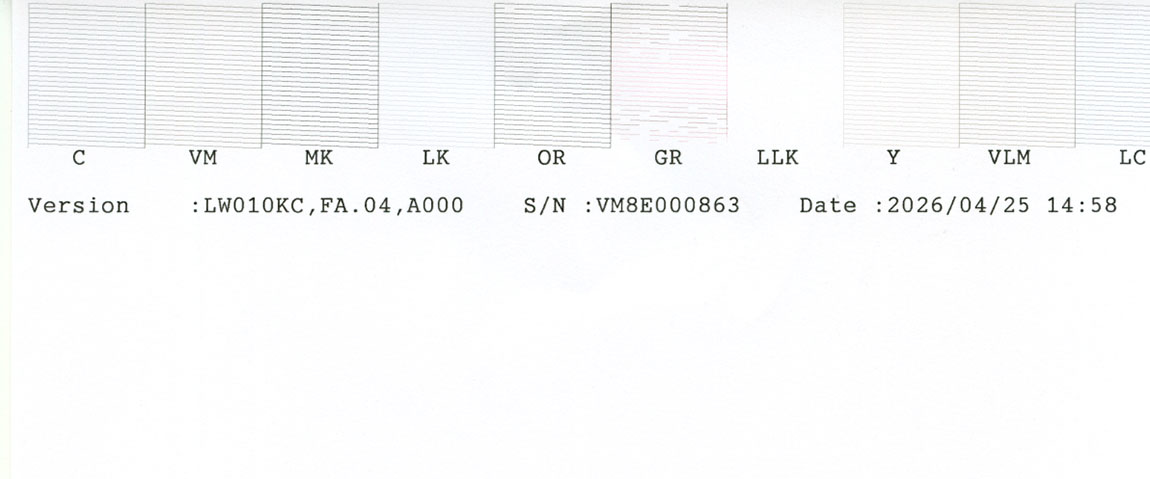
I have a consistent problem where the Green channel on my P9000, which is loaded with PiezoFlush. See attached nozzle check. There is clearly ink bleeding into the channel from adjacent channels, and lots of clogged nozzles. Because I don’t use the Green channel, it doesn’t affect prints, but I’m concerned about the problem spreading.
I am guessing the problem is related to the damper? I was wondering what else could be causing it?
P9000 loaded with Piezo Pro K4 inks. Green channel has PiezoFlush and Orange channel has PK loaded
Thanks
Neil
The Green channel should print PiezoFlush, not sure where the greyscale ink is coming from
Hi Neil,
I hope that you just have a dirty clean station and the Green channel is picking up ink from the flushing box. Take a look at the flush box after a head cleaning and see if it’s foamy or overly wet from not draining, or if the capping seals are grimy. We have videos on the InkjetMall YouTube showing how to clean the capping and flush box of a 9900. Yours will be very similar.
If it’s not that, there is not a way for any other ink to flow into the Green channel’s damper. It has a one way in ink line and a one way out valve.
The worst-case scenario is a split in the ink channel’s side walls allowing infiltration of ink from an adjacent channel. I would think that would show up in the adjacent channel with intermittent air “clogs”.
Rachel
Hi Rachel
Thanks for this
When you say you suspect possible “split in the ink channel’s side walls” I presume you are referring to the side walls in the printhead itself? Which would mean a printhead replacement to rectify?
And my understanding is that on the printhead, Green and Orange are colour pairs. So in theory if there is a leak in the side walls of the Green channel then it is the Orange that is bleeding across into the Green. And that the contamination might start happening in the other direction as well?
Will check flush box and cap station again, but looked clean last time I looked
Damn and blast
Neil
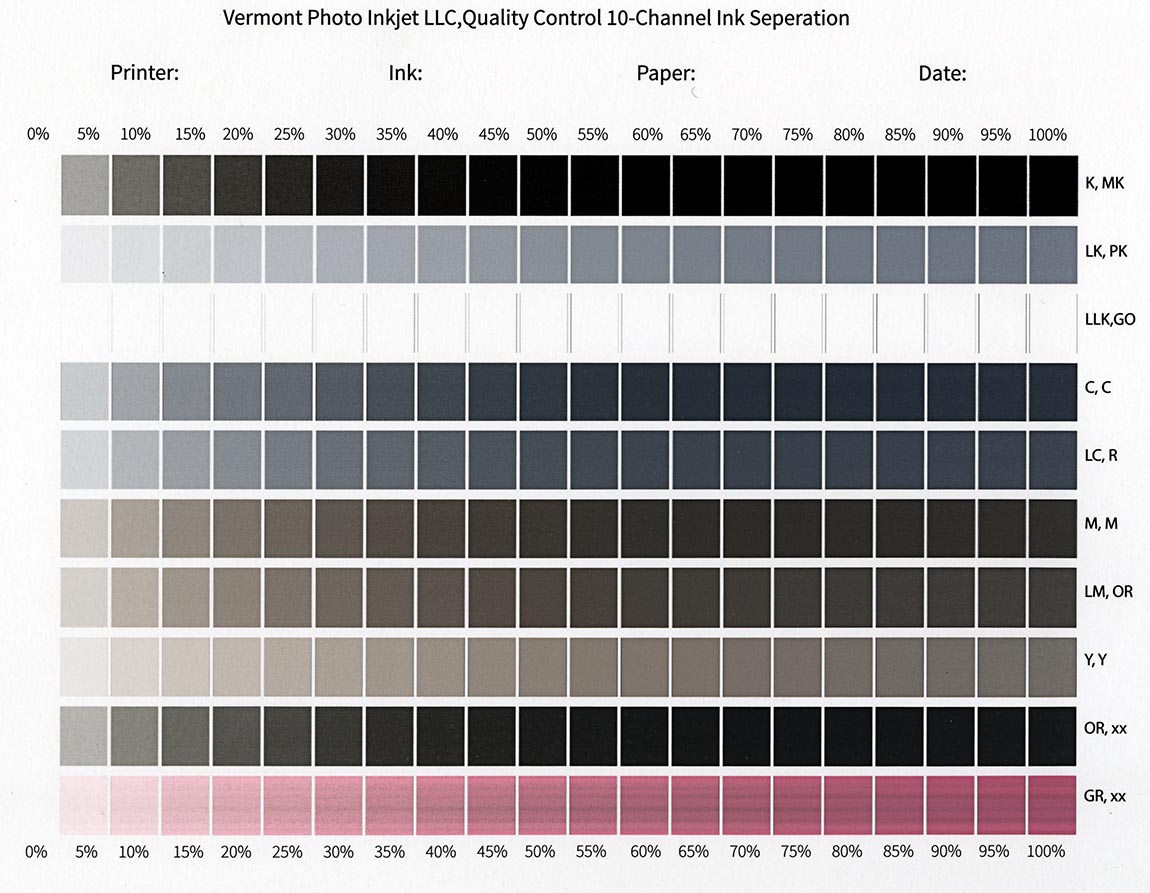
I don’t suspect so! I am just saying in the worst case scenario. Usually it gets picked up from a leaking cleaning station in which the seal is not tight and dirty ink is pulled into the head. You can verify your position by printing out the inkseparation file in QTR Calibration mode and see if the Green Channel prints a pink 21 step. If so - then its a function of head cleaning and the clean station.
R
Thanks Rachel
Will revert after more investigation
What’s going on with the LLK channel? It looks completely blank.
That would be GCO. It is really difficult to see unless you print on glossy paper.
Jon
Ah!!! Thanks Jon! I was wondering why Neil didn’t mention that.
Hi Rachel
Taken me a little while to get back here, but did want to give you feedback,
Initially, when printing the 10 channel ‘ink separation’ file in QTR Calibration, I was still getting the same problem as described, grayscale ink mixing in with the pink of the flush in the Green channel. Same when printing a Green ‘line purge’ file.
Then I noticed the both the Green (PiezoFlush) cart and the Orange (PK) cart were low. Not empty certainly but low. So I refilled the carts. Not an immediate change to the problem but after a week or so it is definitely showing encouraging improvement.
I am hoping this was the cause, though I don’t really understand how a low cart can cause contamination of an adjacent colour. Nevertheless, I am happy if it is such a simple solution, beats replacing the head! And worth the embarrassment of owning up to such a basic oversight on my part,
Will continue to monitor, thanks for your help, much appreciated
Neil
Hi Rachel
Unfortunately, the issue described above continues . I thought it had cleared up after filling the carts, but it has come back. I will attach below a 10 channel Ink Separation chart which shows grey ink contamination in the Green/PiezoFlush channel
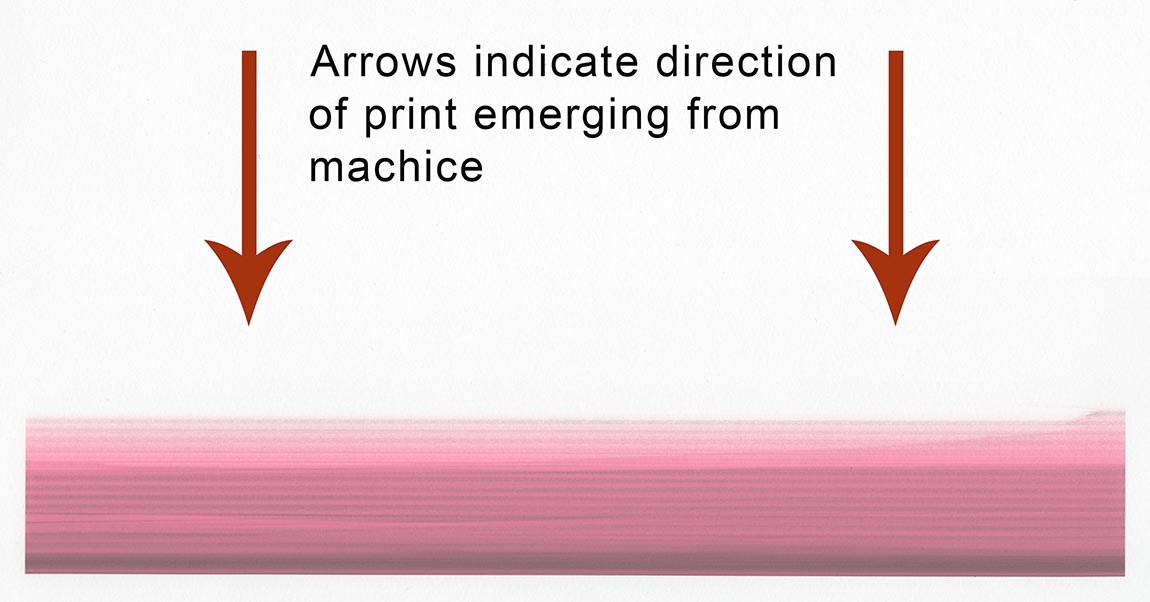
Also attached below is a “Green Chanel Flush” print. After starting out showing significant contamination, it then stops printing completely, indicating ink starvation? It should fill the page with ink, but only prints the first 10% or so then the head continues to travel back and forth but no ink comes out.
Wondering of you have any suggestions maybe?
With thanks
Neil
Hi Neil,
Short of disassembling the printer to look at the ink selector unit and the PiezoFlush travel through it will be difficult to make any assumptions as to the exact source of black pigment in the green flush channel.
PiezoFlush can’t get contaminated in the cartridge by ink in an adjacent cartridge.
The ink line coming from the PiezoFlush cart does not intermingle with other ink lines. They are all welded together in a solid ink line ribbon cable.
The ink line separates from the ribbon cable nearing the ink selector unit and is connected to the ink selector unit directly dumping into the damper that then has a short travel path to the print head.
From the damper forward there is a better opportunity for a defect to have occurred where adjacent channels are intermingling either in the connection from the ink selector unit to the print head or in the print head itself. The starvation may be loss of pressure rather than a fouling filter in the damper. However you would probably see signs of that as ink loss in or around the print head and this should be easily visible once you have the cover off or if you roll the print head into view by unplugging the printer as soon as the head moves after a power on.
I do not believe there is a way for virgin PiezoFlush filled cart to dump black pigments into the ink line on the back side of the ink selector. The dampers are separated from one another. This is why I am zeroing in on the relationship between the print head and ink selector unit. Some defect somewhere in that chain in front of the dampers rather than behind them.
If you are dealing with a hardware defect you probably can not remedy without replacement.
I am curious if this is an issue affecting your prints?
Rachel
Hello Rachel
Thanks for your detailed and helpful reply. What you describes makes sense and also aligns with my understanding. I am hoping that the problem is around the seating of the ink selector on the printhead. The next step would be to lift the ink selector off the printhead and see if I can see any obvious signs of leaking.
And to answer your question, no the issue does not seem to affect the prints. I am happy to ignore it as long as possible. I am concerned though that it will spread. Currently seems to be contained though so the system is usable. I am just hoping the leaking is only in one direction, if the PiezoFlush is also bleeding into the adjacent Orange/PK, I wonder how long before I begin to see it,
with thanks
Neil